
Getting new clients regularly is about standing out with insights and expertise in today’s competitive digital world. The Meta Ads Library offers a powerful way to understand the strategies used by your competitors and identify potential clients by showing active ads on both Facebook and Instagram.
Whether you are a freelancer or running a marketing agency, effectively using this feature can be a game changer for winning new clients. By analyzing trends and offering improvement opportunities, you can connect with different companies across the globe who are ready to enhance their campaigns. In this guide, we will dive into how to use the Meta Ads Library to win new clients easily for digital marketing by mastering ad analysis, identifying gaps, and offering comprehensive solutions.
What is Meta Ads Library?
A powerful tool for digital marketers, providing them with access to active ads across meta-platforms like Facebook and Instagram. There are a few reasons why it is essential for people earning from digital marketing as freelancers and ad agencies.
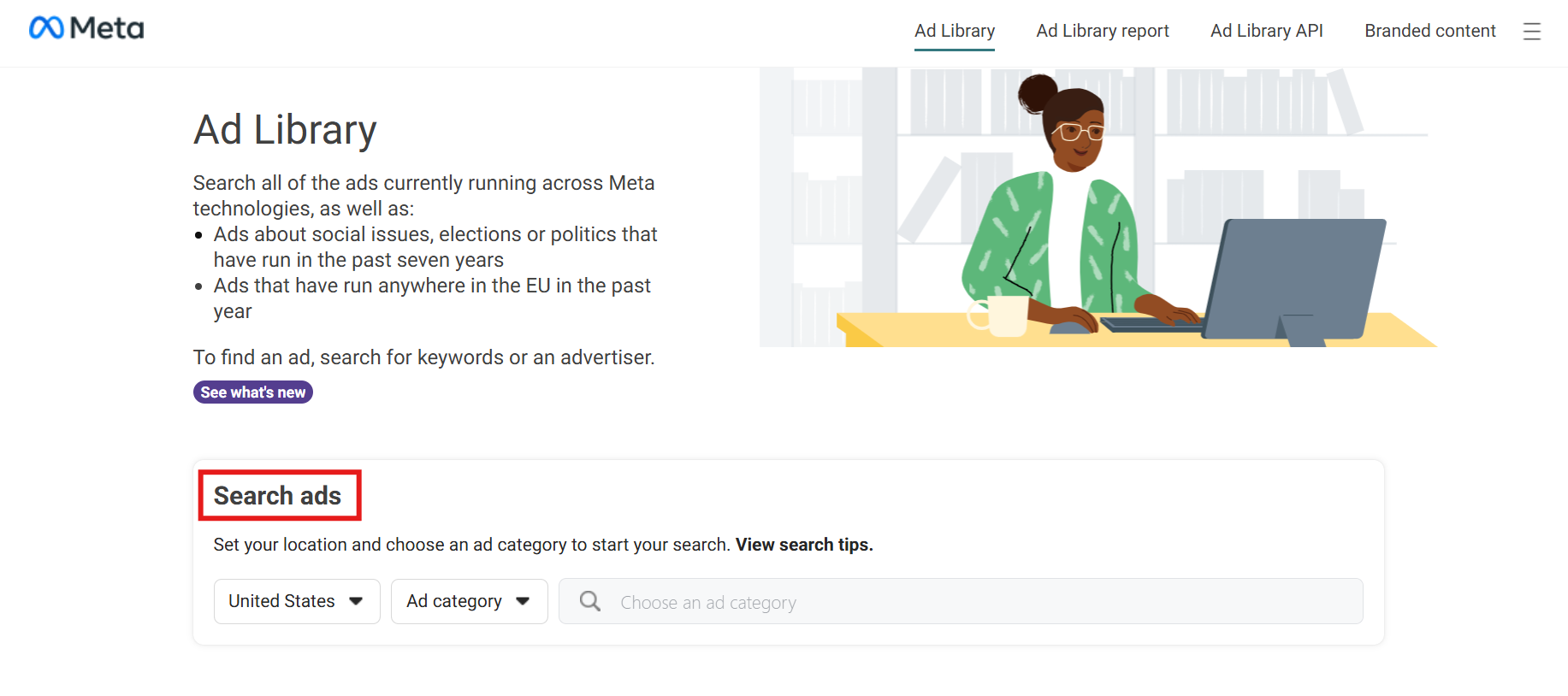
- It offers transparency and insights so that all users can see all active ads for competitor analysis.
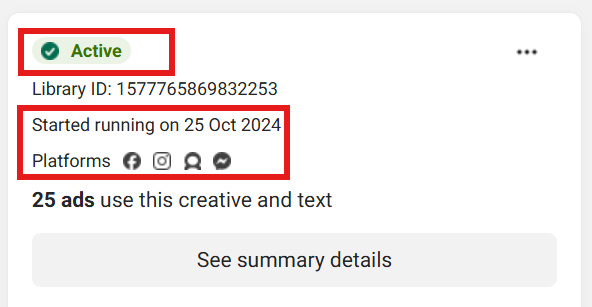
- You can see any ad’s starting running date, format, placements, and targeted audience.
- Competitor analysis is another feature different businesses can apply to their marketing tactics.
- You can discover trends and the latest approaches within your niche and industry.
- It gives you an opportunity for client outreach after analysis to offer them improvements in their campaigns.
Step-by-Step Guide to Analyzing Ads in Meta Ads Library
If you are into digital marketing and want to increase your online income, you must know how to analyze meta-ads. This can help you find new clients in a way that you contact companies by offering them analytics regarding their ad campaigns and suggesting how to improve. Let’s look at a step-by-step guide on how you can analyze ads in the Meta Ads library and use them to pitch your ideas to potential clients. These steps can help you win new clients quickly.
Step 1: Access the Meta Ads Library
- First of all, visit the Meta Ads Library
- Select your specific region and ad category.
- Any specific brand name or company can be accessed through relevant keywords.

Step 2: Filter and Narrow Down Ads
You need to narrow down more by applying specific filters for a better meta-ads analysis.
- You can specify your search by applying location, platform, and ad status (active or inactive).
- Narrowing down by platforms like Facebook and Instagram helps you find ads relevant to your niche.
Step 3: Study Ad Content and Format
Studying ad content and format is the best way to analyze it.
- Look at the creative elements, such as videos, images, and text. Note the ad type used (single image or carousel).
- Identify the visuals, color schemes, and copy styles to reach the target audience.

Step 4: Analyze Messaging and Copywriting
- Analyze how these ads engage users, like their headlines, descriptions, and call-to-action.
- Take notes of how these ads grab attention, like whether they are good in visuals, better at descriptions, or best for a CTA (call-to-action).
- The same photo in the step above can also be taken to examine ads for this step.
Step 5: Examine Ad Frequency and Consistency
Now, you need to examine the ad by following the steps.
- Look at how long the ad has run because longer-running ads indicate success.
- Regular variations or updates in ads show different campaigns and promotions.
- The visuals shown in Step 2 also show how long the ad has been running.
Step 6: Evaluate Audience Targeting
- Meta Ads Library does not provide any specific targeted audience data, but you can still understand it by the nature of an ad, such as the type of products and platforms.
- You can use this information to propose better strategies to target a more specific audience.
Step 7: Record Insights and Prepare Recommendations
- Now, simply document the factors affecting the ads in a good way and areas for improvement.
- Prepare a report that shows the strengths of that specific brand and offers actionable suggestions for better results.
Step 8: Reach Out to Potential Clients
Now, let’s take a look at the final step
- You can use your reports to initiate conversations with brands, offering insights and valuable suggestions on how you can improve their work.
- Show yourself as an expert and help them realize how you can help them with your tailored ad improvements and optimization strategies.
These steps can help you find potential clients by making them realize that you are an expert at what you do. Digital marketing can also increase your online earnings, whether you are a freelancer or running an ad agency.
How to Use Meta Ads Insights to Create a Winning Pitch
Creating a pitch using Meta Ads insights and presenting it to potential clients can make you a valuable digital marketer. This guide will show you how to use Meta Ads Insights to create a data-driven pitch for clients by understanding their needs, presenting unique strategies, and recommending improvement areas.
Let’s take a look at some critical steps to win clients by pitching a data-driven proposal,
1. Analyze Industry Trends and Patterns
- Meta Ads Library allows you to spot different trends across industries, ad formats, and high-performing ad types. For example, you can spot the type of famous in the industry of any potential client you want to target.
- You can highlight these trends in your pitch to show that you understand them and can use them to a client’s advantage.
There’s no rocket science; you can also do this as a beginner. Just open the Meta Ads library, search for different ad categories across different industries one by one, look for any specific brand names, and start analyzing their campaigns.
2. Identify Top Competitors’ Strategies
- Analyze how your competitors are engaging with their target audience. Note down their ad strategies, such as the visuals they have used, the text type, and the CTAs.
- Show it to clients and tell them you understand their competitors’ space and can help them stand out with your work.
3. Showcase Audience Engagement Insights
- This feature is not directly available in the Meta Ads library, but you can still analyze audience engagement by the type of ads running and their specifications. For example, you can show your clients that ads with better visuals and strong CTA’s can perform better for a target audience.
- You can include examples in your pitch to show how targeting audience preferences can improve engagement and ROI.
4. Create Data-Driven Suggestions for Improvement
- In the insights, show data on ad formats, duration, and frequency and suggest what would work better in the long run.
- You can show competitors success with either this or that experimenting approach.
5. Highlight (USPs) Based on Insight
- You can identify what your prospective client’s competitors are lacking and use it as an advantage to propose better ideas. For example, if a competitor is focusing on their products’ features, you can suggest customer feedback or benefits of your prospective clients’ products to be used.
- Show them how your proposed strategy can create engagement with their target audience.
6. Recommend Ad Frequency and Timing for Reach
- You can also recommend the best ad frequency and timing based on competitors’ data. For example, if an ad works better during a specific time of the month or any event, try suggesting running ads during that time.
- It can make the client understand how to make the most of their audience by not overwhelming them.
7. Outline Potential ROI and Success Metrics
- You can show examples of how these strategies would improve the ROI. Set goals like better engagement, a better click-through rate, and higher conversion rates.
- Suggesting data-driven plans can help the client envision the chances of success with the strategies you provided.
Using these insights shows that your pitch is data-driven, strategic, and according to clients’ needs. Focusing on trends, competitor analysis, and target audience shows that you are an expert at what you do and can bring results for them.
Professional Tips to Reach Out to Potential Clients
You have done both ad analysis and collecting insights. Now comes the third step, which is reaching out to prospective clients with a tailored analysis of their marketing strategies and areas for improvement.
Here’s a guide on approaching them with an analysis-based outreach strategy.
1. Identify Key Decision-Makers
- Start by identifying the right people to approach, like marketing managers or digital marketing heads. LinkedIn profiles or websites are an excellent source for identifying such people.
2. Craft a Personalized Email Subject Line
- You can grab attention by using subject lines for your analysis, such as “Insights on your Meta Ads strategy” and “Area of improvement.” This tactic immediately grabs attention, establishing in the readers’ minds that this is more than a normal pitch.
3. Introduce Yourself and Establish Credibility
- A professional introduction establishes your credibility. Try to show your expertise in digital marketing and using tools like the Meta-Ads library. Please explain why you are reaching out to them and how your insights are derived from some data that is highly beneficial for them.
4. Summarize Your Analysis with a Hook
- Trick the client in a way that he cannot let your insights go without having a look. For example: “I have gone through your campaigns and analyzed that you run only ads based on single images, while the trends and data say that carousel ads perform 30 percent better than that.”
5. Provide Value by Offering Key Takeaways
- Share at least 2-3 findings that show the strength of your analysis.
For example:
- Ad format suggestions
- Audience Insights
- Competitive Analysis
6. Outline How Your Services Can Help
- Provide solid reasons for how you can help them improve so it’s easy to make decisions. For example, you can say, “With my help, we could optimize your ad format and targeting strategy to reach high-engagement segments.”
7. Include a Call to Action for a Follow-Up Meeting
- You can conclude by inviting them to a short meeting to discuss your findings in more detail. Show it as an opportunity for them to get more insights without any obligations. For example, “I’d love to schedule a 15-minute call to discuss these insights and potential strategies in more detail.”
8. Offer a Small Sample Analysis if Needed
- If needed, consider offering a sample analysis, which could be an overview of a specific ad or audience, to engage them. It will show the depth you can bring if they choose to work with you.
9. Follow Up with Professional Persistence
- If you don’t get a response, follow up with a brief email after a week. This time, you can share new insights to prove your interest in the trends.
This approach creates an image for you as a strategic, data-driven digital marketer. Using these strategies, provided with valuable data, you can increase your chances of continuously winning new clients.
How to Use Meta Ads Library Effectively
Effective use of the Meta Ads Library is an excellent skill for digital marketers, whether they are freelancers or run an ad agency.
Here are a few tips to make the most of Meta’s tool, which can help you grow fast in this competitive digital world and find new clients.
Research Goals
- Define your search goals clearly, whether you analyze competitors, look for ad trends, or find inspirations for new campaigns.
Use of Keywords
- Use keywords or brand names when looking for advertising campaigns in your niche. This will give you the latest insights into your competitors’ ad strategies.
Analyze Ad Formats
- Ad formats, whether single-image ads or carousel ads, can be examined comprehensively to analyze trends and preferences.
Messaging Patterns
- You can examine the messaging patterns and CTAs ( Call to Action) to analyze which strategy better engages your industry’s audience.
Ad Frequency
- Check the ad frequency and running time for different campaigns. The longer the campaign runs, the better its chances of being successful.
Target Audience
- Although the direct target audience isn’t provided, you can still check it by analyzing the type of ad and the industry it belongs to.
Ad Trends
- Monitor the ad trends continuously to set up your calendar for different holidays and events. It helps you run better campaigns.
FAQs
- What is the Meta Ads Library, and how is it used?
The Meta Ads library is a free tool for viewing active ads across Meta platforms. It can be used to analyze ad strategies and achieve maximum potential.
- How does the Meta Ads Library help my ad agency?
You can analyze the types of ads and strategies your competitors use and prepare insights to pitch to prospective clients and easily win new clients.
- Can I see specific targeting details of the ads in the Meta Ads Library?
You can see general ad demographics and analyze the target audience by brand names and approximate location targeted.
- How do you find high-converting examples in the Meta Ads Library?
Analyzing the period for which ads run can help you find high-converting ads, as successful ad campaigns tend to run longer.
- How can I use Meta Ads Library insights to pitch to new clients?
You can use the Meta Ads Library insights to pitch to new clients by analyzing their competitors’ strategies, ad trends, and areas for improvement.
Conclusion
The Meta Ads Library is an excellent tool for freelancers and ad agencies. You can attract more clients by following the strategies discussed in this guide. For example, you can use the Meta Ads Library to check for insights on different ad campaigns being run by competitors and use them to pitch to a prospective client.
These strategies can be game changers for a digital marketer. You just need to keep hustling for more and more in life. Be a professional with whom people would love to work.
WikisInfos is a team of high-end professionals who are always available to help their community grow in this competitive digital world by offering their expertise in different online earning fields, which can help you make money from the comfort of your home, no matter which online earning field you belong to. We’ve covered you with many informative ideas and strategies for a successful online career.
You can contact us directly with any relevant queries on this topic. Our team is always here to help you in any way. You can also share your success stories with us in the comment box to inspire others trying to make their bread in the online earning field.
Read More: 8 Proven Websites for Online Jobs in Pakistan